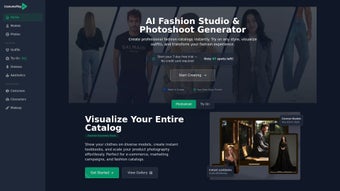

Download CostumePlay AI – AI‑Powered Fashion Catalog & Virtual Try‑On Tool
Overview: Transform Your Style Exploration with CostumePlay AI
In today’s fast‑moving fashion landscape, visual storytelling has become the decisive factor that turns browsers into buyers. CostumePlay AI answers that demand by delivering a cloud‑native, AI‑driven platform that lets designers, boutique owners, and influencers create professional‑grade lookbooks, high‑resolution product images, and realistic virtual try‑ons without ever stepping onto a photography set. The service combines a secure asset‑management hub with cutting‑edge generative models, giving users the confidence that every image they download carries full commercial rights and is protected by end‑to‑end encryption. Whether you’re launching a seasonal collection, refreshing an e‑commerce catalog, or simply experimenting with personal style, the tool streamlines the entire workflow—from raw sketches to polished marketing assets—in a matter of minutes.
Built on a robust multi‑region cloud infrastructure, CostumePlay AI automatically scales processing power to match demand, ensuring that render times stay consistent even during peak usage. The platform’s user‑friendly interface works in any modern browser, meaning there is no need for expensive hardware, GPU‑intensive installations, or lengthy software updates. All data is stored in encrypted containers (TLS 1.3 in transit, AES‑256 at rest), and granular permission controls let teams collaborate safely across continents. By removing traditional bottlenecks—expensive photoshoots, complex design software, and licensing headaches—CostumePlay AI empowers creators to focus on the core of fashion: imagination, trend‑setting, and conversion.
The result is a seamless, end‑to‑end solution that accelerates time‑to‑market, reduces production budgets, and opens up high‑quality visual creation to anyone with an internet connection. In short, CostumePlay AI is the bridge between creative vision and market‑ready assets, delivering a secure, scalable, and fully commercial‑rights‑inclusive experience for the modern fashion professional.
Key Features of CostumePlay AI
CostumePlay AI packs a suite of AI‑enhanced capabilities designed to address every stage of the fashion content pipeline. Below is a detailed look at the most impactful features, each engineered to save time, cut costs, and elevate visual quality.
- AI‑Driven Lookbook Generation: Upload a handful of product images and let the algorithm auto‑arrange them into sleek, brand‑consistent lookbooks ready for immediate download in PDF or PNG format.
- Instant Virtual Try‑On: Drag‑and‑drop clothing items onto a library of diverse, pose‑ready avatars. The AI simulates realistic fabric drape, lighting, and body movement, delivering lifelike previews in seconds.
- High‑Definition Photo Upscaling: Transform low‑resolution shots into crisp, 4K‑ready visuals using proprietary super‑resolution models, perfect for e‑commerce thumbnails and print ads.
- Seasonal Collection Visualization: Populate entire collections on multiple model types, enabling buyers and stylists to compare looks side‑by‑side without manual photo shoots.
- Secure Asset Management: Encrypted uploads, role‑based access, and version control keep creative assets safe and organized for teams of any size.
- Full Commercial Rights: Every image generated is yours to use in advertising, social media, packaging, or any commercial context—no additional licensing required.
- Cross‑Platform Web Access: No installations needed; the tool runs on Windows, macOS, Linux, Android, and iOS browsers, ensuring maximum reach.
- Custom Branding Options: Insert your logo, brand colors, and typography into exported catalogs for a cohesive brand experience.
- Robust API & Integrations: RESTful API, pre‑built Shopify and WooCommerce connectors, and webhook support let you embed the service directly into existing workflows.
- Continuous Model Updates & 24/7 Support: Monthly AI enhancements keep the platform on the cutting edge of fashion trends, backed by round‑the‑clock chat assistance.
Together, these features create a comprehensive environment where creative teams can iterate faster, experiment without risk, and deliver market‑ready visuals that drive engagement and sales.
Installation, Usage & Compatibility: Getting Started with CostumePlay AI
One of CostumePlay AI’s biggest selling points is its zero‑install architecture. Because all processing happens in the cloud, you only need a recent web browser—Chrome, Edge, Firefox, or Safari—to start creating. Follow the step‑by‑step workflow below to launch your first catalog:
- Create an Account: Visit costumeplay.ai, click “Sign Up,” provide a valid email, set a strong password, and confirm via the verification link.
- Select a Subscription: Choose the free tier (20 renders/month, 720p) or upgrade to the Premium plan ($29 / month) for unlimited renders, 4K exports, and priority support.
- Upload Assets Securely: Drag product photos, sketches, or CAD files into the Asset Manager. Files are encrypted in transit (TLS 1.3) and at rest (AES‑256).
- Pick a Template or Start Blank: The Catalog Builder offers 15 pre‑designed layouts. For full creative control, select a blank canvas and add sections as needed.
- Apply AI Enhancements: Use “Auto‑Scale” for upscaling, “Virtual Try‑On” to dress models, or “Lookbook Auto‑Layout” to auto‑populate pages.
- Customize Branding: Insert your logo, adjust typography, and set brand colors. Real‑time preview shows exactly how the final product will appear.
- Export & Download: Choose export format (PDF, PNG, JPEG). The system generates a secure download link that expires after 24 hours for added safety.
- Integrate with E‑Commerce: Use the built‑in API or pre‑made Shopify app to push new images directly to product pages, keeping your catalog fresh.
Compatibility is baked into the platform’s design. The service runs on Web‑Based (Windows, macOS, Linux, Android, iOS) devices, requiring only an internet connection and a modern browser. No local GPU or heavy software installation is necessary. For enterprises with strict data‑sovereignty requirements, a Docker container can be deployed on private clouds, providing the same AI capabilities while keeping data behind the corporate firewall.
Should you encounter any hiccups, the Help Center offers video tutorials, step‑by‑step guides, and a searchable knowledge base. For real‑time issues, the 24/7 chat widget connects you with a technical specialist who can troubleshoot upload errors, rendering delays, or API integration questions within minutes.
Pros & Cons and Frequently Asked Questions
Pros
- Zero‑install, browser‑based access from any device.
- AI‑powered upscaling and virtual try‑on drastically cut photography costs.
- Full commercial rights eliminate licensing concerns.
- Encrypted asset storage safeguards proprietary designs.
- Robust API enables seamless integration with major e‑commerce platforms.
- Monthly AI model updates keep the tool aligned with current fashion trends.
Cons
- Requires a stable internet connection; offline work is not possible.
- Premium plan may be expensive for solo freelancers on a tight budget.
- Advanced customization beyond templates assumes basic design knowledge.
- Render times can increase during peak traffic periods.
- Free tier limits render count and resolution.
FAQ – Your CostumePlay AI Questions Answered
-
Is CostumePlay AI really free to use?
Yes. The free tier provides up to 20 AI‑generated renders per month at 720p resolution. For unlimited renders, higher resolutions, and commercial‑grade features, you’ll need to upgrade to the paid plan.
-
Can I use the generated images for my brand’s advertising?
Absolutely. All images created on CostumePlay AI come with full commercial rights, allowing unrestricted use in ads, social media, print, and e‑commerce.
-
How secure is my uploaded content?
Uploads are encrypted in transit via TLS 1.3 and stored at rest with AES‑256 encryption. Role‑based permissions let you control who can view, edit, or download each asset.
-
Do I need a powerful computer to run CostumePlay AI?
No. All heavy AI processing occurs on CostumePlay’s cloud servers, so a standard laptop, tablet, or smartphone with a modern browser is sufficient.
-
Can I integrate CostumePlay AI with my existing Shopify store?
Yes. The platform offers a pre‑built Shopify app and RESTful API that automatically sync generated product images to your store’s catalog, keeping your listings up‑to‑date.
Conclusion & Call to Action
CostumePlay AI stands out as a versatile, secure, and AI‑enhanced solution for anyone serious about modern fashion creation and e‑commerce marketing. By eliminating traditional bottlenecks—expensive photoshoots, manual layout design, and complex licensing—it empowers designers, retailers, and influencers to focus on what truly matters: creativity and conversion. Whether you’re launching a new collection, revamping an online store, or simply experimenting with style, the platform’s blend of ease‑of‑use and professional‑grade output makes it a worthwhile investment.
Ready to experience a seamless fashion workflow? Sign up for the free tier today, explore the AI‑driven catalog builder, and see how quickly you can generate market‑ready visuals. For businesses seeking the full suite, upgrade to the premium plan to unlock unlimited renders, API access, and priority support. Transform your fashion process—download CostumePlay AI now and step into the future of style.



.png)



